Your Publisher files have a future.
Keep editing your .pub files, no Publisher needed.
Keep opening and editing your Publisher files, just like always.
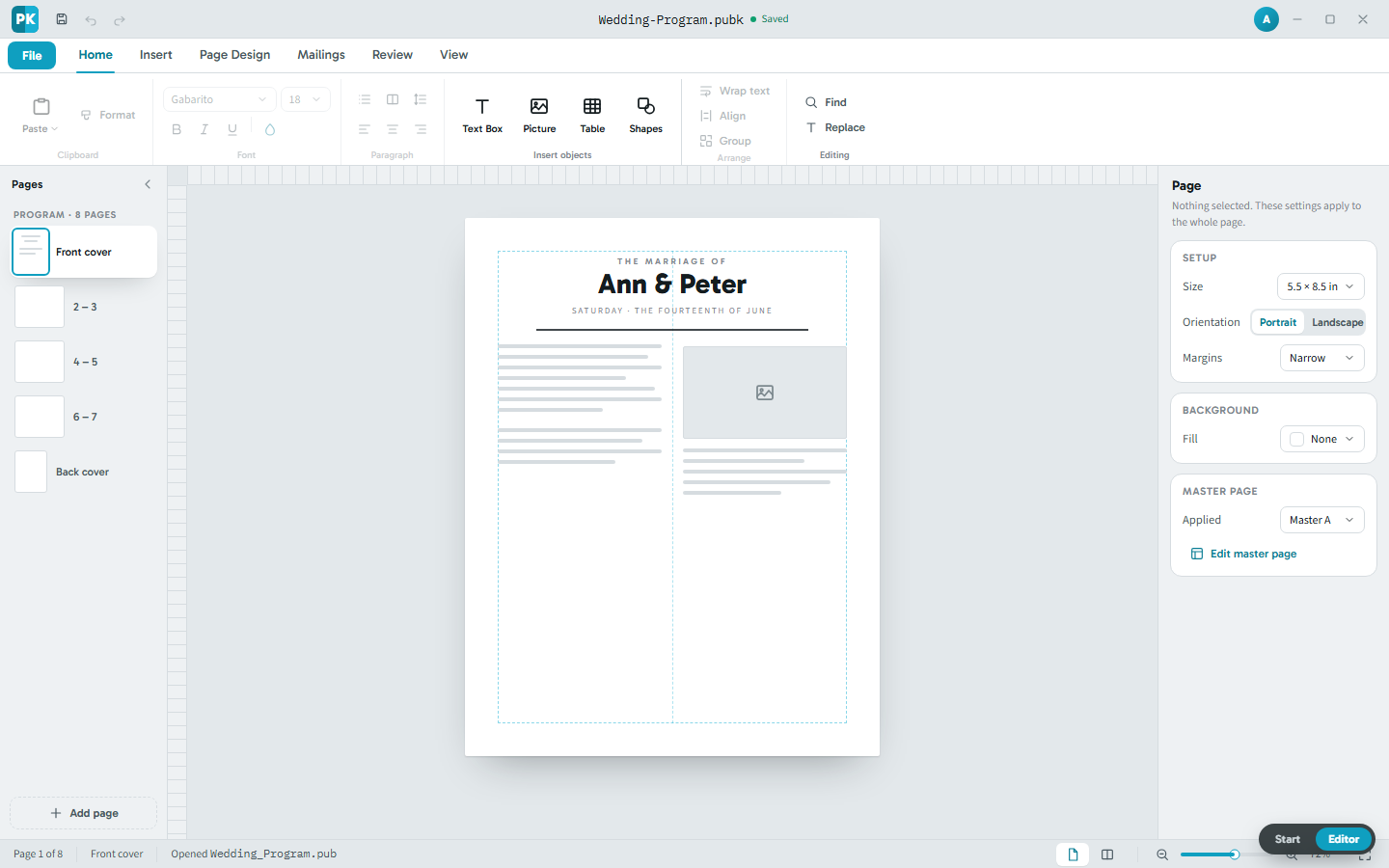
PubKeep is the desktop app that opens your .pub files and keeps them editable, page for page. The same text boxes, master pages, and fold-over booklets you already use, on Windows and Mac, right on your own computer. It is in early access now, and beta testers are opening and editing their files today.
Access is through the waitlist, and we invite testers in. It's free while it's in beta, then a one-time $99 when it launches, no subscription.
You can stop worrying
Publisher is leaving. Your work is not.
Microsoft removes Publisher from Microsoft 365 on October 1, 2026. That is the app going away, not your files. PubKeep keeps them open and editable, and it's in early access now.
Your files still open
PubKeep reads your .pub files directly. You do not need Publisher on the machine.
Your layouts still edit
Text boxes, columns, and pages stay live. Move a photo or fix a date, then export again.
Your tools still feel familiar
Master pages, guides, and booklets work the way you expect. The shapes you learned still apply.
You do not have to rebuild twenty years of layouts in Word. You do not have to learn Canva.
A first look
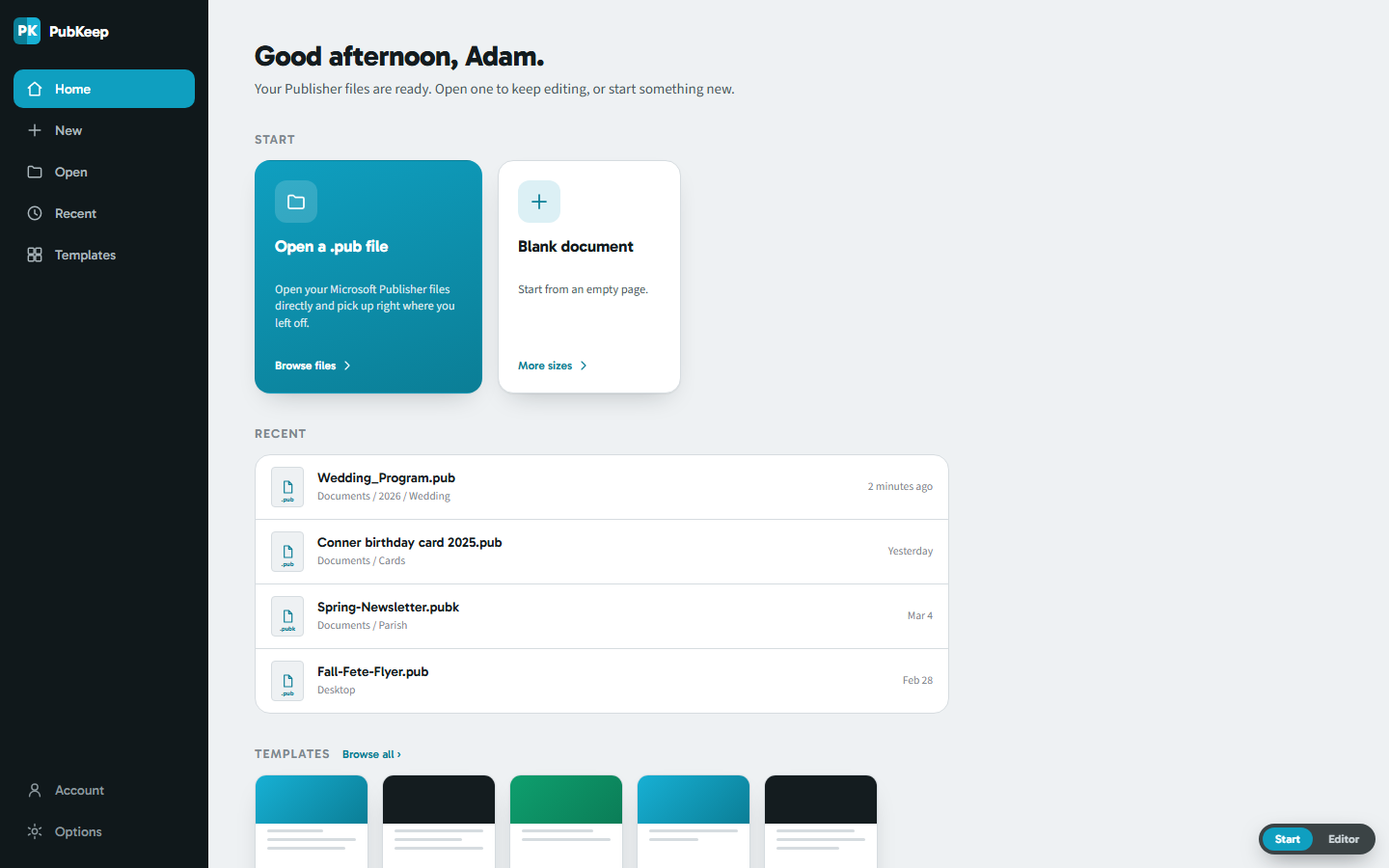
Open a .pub file. Pick up where you left off.
PubKeep opens to your recent work, so a Publisher file is one click away. Open a .pub directly, start from a template, or begin a blank page. No import step, and nothing to convert first.
A look at the PubKeep editor. PubKeep is in early access, and the waitlist is how you get in.
What PubKeep does
Everything you created in Publisher, carried forward.
One app for your Publisher files. It opens them, keeps them editable, and exports print-ready PDF, right on the computer you already have, no internet needed.
Opens .pub without Publisher installed
PubKeep reads the Publisher format on its own, right on your machine. You do not need a copy of Publisher, an internet connection, or even Windows.
High fidelity, page for page
PubKeep aims to open your file the way you built it, page for page, not reflowed the way the free importers do. Text stays text, and every box stays movable.
Windows and macOS
Publisher only ran on Windows for 35 years. PubKeep runs on both, so you pick the computer.
An open save format
PubKeep saves to .pubk, a plain zip of JSON and your images. You can open it with any archive tool and see what is inside.
The layout tools you used
Master pages, fold-over booklets, guides, bleed, and crop marks. Mail merge comes later.
Buy it once
One payment, and the app is yours. No subscription, and no bill that shows up every month.
How we know it works
Built on an engine we already ship.
We did not start with the editor. We started with the hard part: matching Publisher as closely as we can. Here is the order.
-
1 Shipped
Converter
The PubKeep Converter produces exact PDFs from your .pub files, page for page. It sets the reference every later step is measured against.
-
2 In early access
Engine and .pubk
Our own engine opens .pub files and saves .pubk. We score it page by page against Publisher's own export. It's in early access now, and beta feedback keeps raising the bar.
-
3 In early access
Editor
The same engine draws the page you edit. What you see on screen is what the PDF export draws, so there are no surprises at print time. Beta testers are editing with it today.
Pricing
Free while it's in beta.
Right now PubKeep is free while it's in beta. Join early access, use it, and help us shape it. When it launches it's a one-time introductory Founder price of $99, not a subscription. Microsoft removed Publisher from a subscription people were still paying for. PubKeep works the other way.
No subscription, ever.
Founder license
Free while it's in beta
A one-time introductory Founder price of $99 when it launches. No subscription.
- Free to use while it's in beta
- One-time introductory Founder price of $99 at launch, no subscription
- 1 year of updates, then keep the version you have
- No card needed to join
- For one computer
Have .pub files to convert now? The Founder license is free with any PubKeep Converter pack, so you rescue your files today and keep editing in early access.
Need it on more than one computer? Email hello@pubkeep.com.
Nothing to pay now. PubKeep is free while it's in beta, and there is no subscription.
From an early user
“I was greatly distressed at the prospect of losing the thousands of Microsoft Publisher files that I’ve created for a number of nonprofits and other organizations over the past 30 years. PubKeep is a better solution than I even dared hope for in that not only can I save and view my existing files, I can modify them or create new ones in an app nearly identical to the user-friendly environment I’m accustomed to. Kudos for creating a solution that allows me to continue to quickly and easily create print-ready files for nearly all purposes.”
“I am just so excited that we have an answer for Publisher. I am just a church secretary and don’t want to have to learn programs that I will never fully use. Thank you so much!”
Early access
Get on the early access list.
Tell us where to email you and we'll invite you into early access. It's free while it's in beta.
Founding cohorts
Tell us what you run and you join the right founding cohort. Founding Churches, Founding Classrooms, and Founding Nonprofits get into early access first, lock the founder price, and get our help bringing a whole archive across. That is why the form asks what kind of organization you are.
You're on the list. We'll email you when your invite is ready, and nothing else.
In their words
You are not the only one.
These are public posts from the Microsoft Q&A community after the announcement.
We use Publisher for our church, too. It is ideal for formatting bulletins. I use the 8.5 by 11 fold-over booklet format. I'm not sure how I would accomplish this with any other software.
Word is much too clunky and ornery for any serious layout scenarios; it's a word processor.
I've heard it suggested that PowerPoint is a good alternative and I almost choked.
Canva/MS Designer type products just aren't good replacements, because they're so 'smart' that they're stupid. Everything auto-resizes and auto-crops.
I've been using Publisher to make all sorts of things, birthday cards, newsletters, leaflets, booklets, calendars, etc. I was gutted to hear that it will be discontinued. I genuinely don't know what I would do without it!
Questions
Common questions
PubKeep is already in early access, so people are using it on their own files right now. We do not have a general release date yet. We open access wider as the engine clears the public fidelity test we publish, and the waitlist hears first.
You pay nothing to join or to use the beta, so you carry no risk. There is no charge and no card needed. If PubKeep never reaches launch, you are out nothing.
Yes. That is what PubKeep does: open your Publisher files and keep them editable. It is in early access now. Publisher changed over 35 years, so some very old files may need extra work, and coverage widens from there.
Yes. PubKeep runs on Windows and Mac. Publisher only ran on Windows, so this is the first time your .pub files open natively on a Mac.
LibreOffice Draw and Scribus can import a .pub, but they reflow it. Fonts shift, spacing moves, and you clean up one file at a time. PubKeep aims for high fidelity, page for page, and keeps your file editable without the reflow. It is in early access now, and free to try while in beta.
No. PubKeep opens your Publisher files and covers the layout work you did in Publisher. It is not a copy of Microsoft's app, and it does not use Microsoft's menus or icons. It is built to feel familiar in shape.
No. PubKeep opens .pub files directly, so you do not have to convert them first. If you only need PDFs today, the PubKeep Converter can do that now. The desktop app is for people who want to keep editing.
No, it's not a subscription. It's free while in beta, and a one-time introductory Founder price of $99 at launch. You buy it once and the version you buy runs forever, no monthly bill. Your purchase includes 1 year of updates; after that you keep the last version you got, and you can renew if you want to keep getting updates.
No. PubKeep saves to .pubk, an open format that anyone can read. The .pub format is closed and undocumented, so writing it safely is not something we can promise. You can still export a print-ready PDF any time.
PubKeep is a product of Saint Systems, a long-time Microsoft partner. We have built on Microsoft's platform for years. You can reach us at hello@pubkeep.com.
Keep your work
Keep publishing.
Your Publisher files have a future. Join the early access waitlist and we'll invite you in.